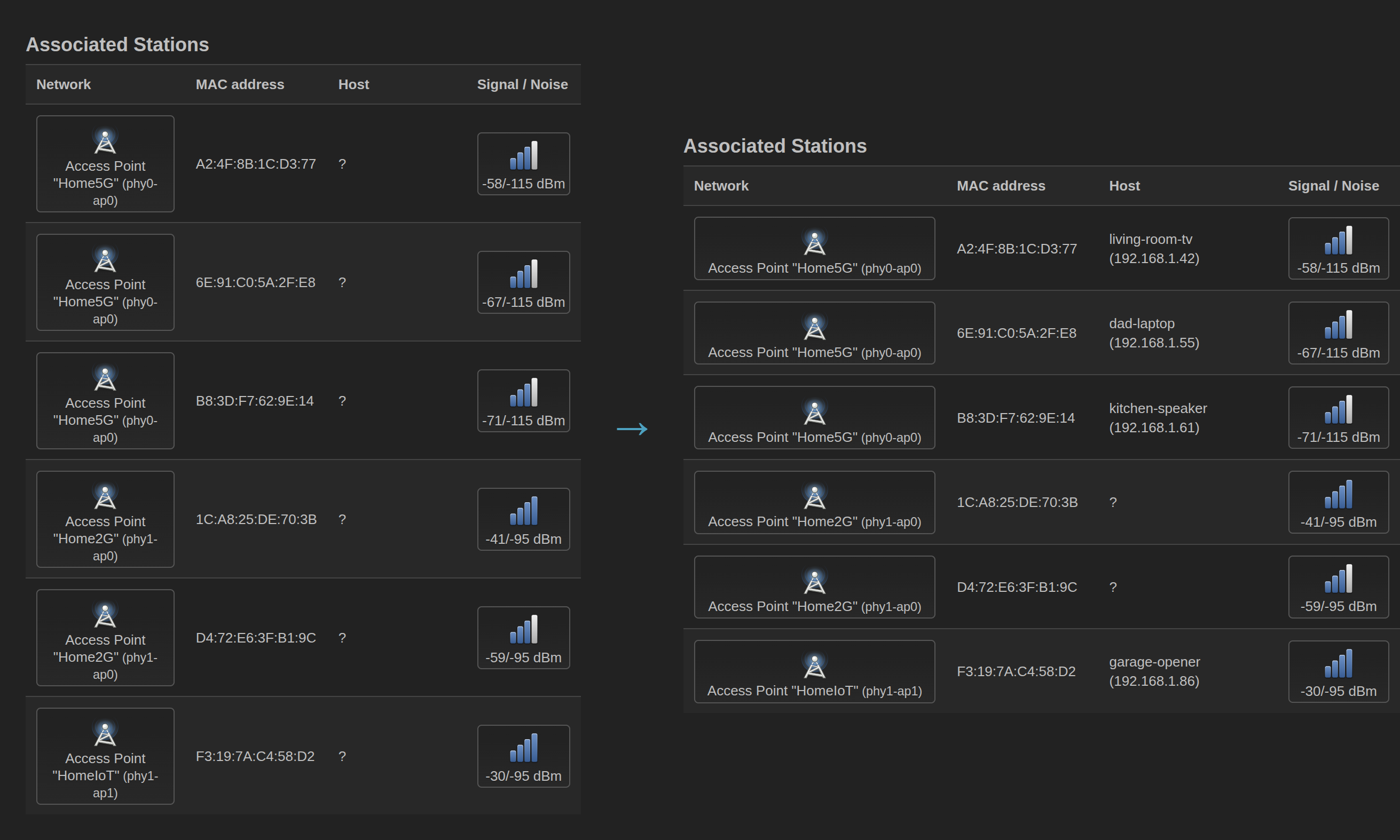
If you run OpenWrt as a dumb access point, you’ve probably noticed that LuCI’s Network > Wireless > Associated Stations page shows ? for every client hostname. This is because the AP doesn’t run a DHCP server - another device (your router) handles that - so /tmp/dhcp.leases is empty and LuCI has nothing to look up.
The hostnames are right there, though. DHCP packets from clients flow through the AP’s bridge, and they contain the hostname in Option 12. We just need to capture them.
The Problem
LuCI resolves hostnames for wireless clients via rpcd-mod-luci, which reads /tmp/dhcp.leases. On a full router running dnsmasq as the DHCP server, this file is populated automatically. On a dumb AP with DHCP disabled, it’s always empty.
The clients are sending their hostnames - every DHCP Discover and Request includes Option 12 (Hostname). The packets transit the AP’s bridge (br-lan) on their way to the router. We can sniff them with tcpdump and write the results to the lease file ourselves.
Verifying the Data is There
Before writing any scripts, confirm you can see hostnames in the DHCP traffic:
| |
You should see output like:
BOOTP/DHCP, Request from aa:bb:cc:dd:ee:f1, length 291
      Client-IP 192.168.1.42
      Client-Ethernet-Address aa:bb:cc:dd:ee:f1
      ...
      Hostname (12), length 9: "my-laptop"
If Hostname (12) appears, you’re good.
The Approach
The DHCP exchange between a client and server looks like this:
- Client Request - contains the hostname (Option 12), MAC address, and sometimes a requested IP
- Server ACK - contains the granted IP (
Your-IP), actual lease time (Lease-Time), and the client’s MAC
Both packets pass through br-lan. The script correlates them: it stores the hostname from the Request, then when the ACK arrives for the same MAC, it grabs the actual lease time and IP, and writes a complete lease entry.
The script also learns the DHCP server’s MAC automatically from the first Reply packet it sees, so it can filter out the server’s own DHCP traffic (my upstream router was spamming Discovers every few seconds and polluting the lease file).
The Script
Install tcpdump-mini:
| |
Create /usr/sbin/dhcp-hostname-sniff:
| |
A few things worth noting:
- FIFO instead of a pipe - the
while readloop must run in the main shell process, not a subshell, so that thetraphandler works and procd can actually stop the service. A pipe (tcpdump | while read) creates a subshell that never receives SIGTERM. - Shell parameter expansion -
${line##* }and${line%%\"*}instead of spawningawkorsedfor each line. On a resource-constrained AP, avoiding subprocesses in the hot loop matters. evalfor hostname storage - busybox ash has no associative arrays. We store hostnames keyed by sanitized MAC (aa:bb:cc:dd:ee:ffbecomesaa_bb_cc_dd_ee_ff) usingeval. It’s ugly but it works.- Atomic writes -
mktemp+mvprevents partial reads if LuCI queries the lease file mid-write. - Expired entry cleanup - the
awkcommand that removes the old entry for the current MAC also drops any entries past their expiry timestamp.
The Lease File Format
The script writes entries in the format rpcd-mod-luci expects:
<expiry_epoch> <MAC> <IPv4> <hostname> <client-id>
For example:
1773120600 aa:bb:cc:dd:ee:f1 192.168.1.42 my-laptop *
LuCI’s getDHCPLeases function reads every entry, computes remaining time as expiry - now, and displays it. It does not filter out expired entries - they show as “expired” but remain visible until removed.
Init Script
Create /etc/init.d/dhcp-hostname-sniff:
| |
Enable and start:
| |
Hostnames will populate as clients renew their DHCP leases. With a typical 600-second lease time, all devices should appear within 10 minutes.
Surviving Firmware Upgrades
Three things need to persist across sysupgrade:
1. The script itself - /usr/sbin/ is not preserved by default:
| |
2. The init script - /etc/init.d/ is under /etc/, so it’s preserved automatically.
3. Re-enabling the service and reinstalling tcpdump - sysupgrade recreates /etc/rc.d/ from installed packages, so the symlink that enables our service gets lost. A uci-defaults script seems like the right fix - it runs once on first boot after upgrade - but it races with package initialization. The package manager rebuilds /etc/rc.d/ after uci-defaults has already run and deleted itself, wiping our symlink for good.
/etc/rc.local runs after everything else and on every boot, so it won’t get stomped. The operations are all idempotent:
| |
/etc/rc.local is under /etc/, so it’s preserved across sysupgrade.
Gotchas
- Devices that don’t send hostnames - some devices with privacy features (e.g., Apple’s Private Wi-Fi Address) may not include Option 12 at all. There’s no fix for this short of static leases on the router.
- The AP’s own MAC -
SELF_MACfilters out the AP itself if it appears in DHCP traffic. The server’s MAC is learned dynamically from the first Reply packet. - Multiple APs - each AP runs its own sniffer and only sees traffic from clients connected to it. This is fine - each AP populates its own lease file for its own LuCI instance.