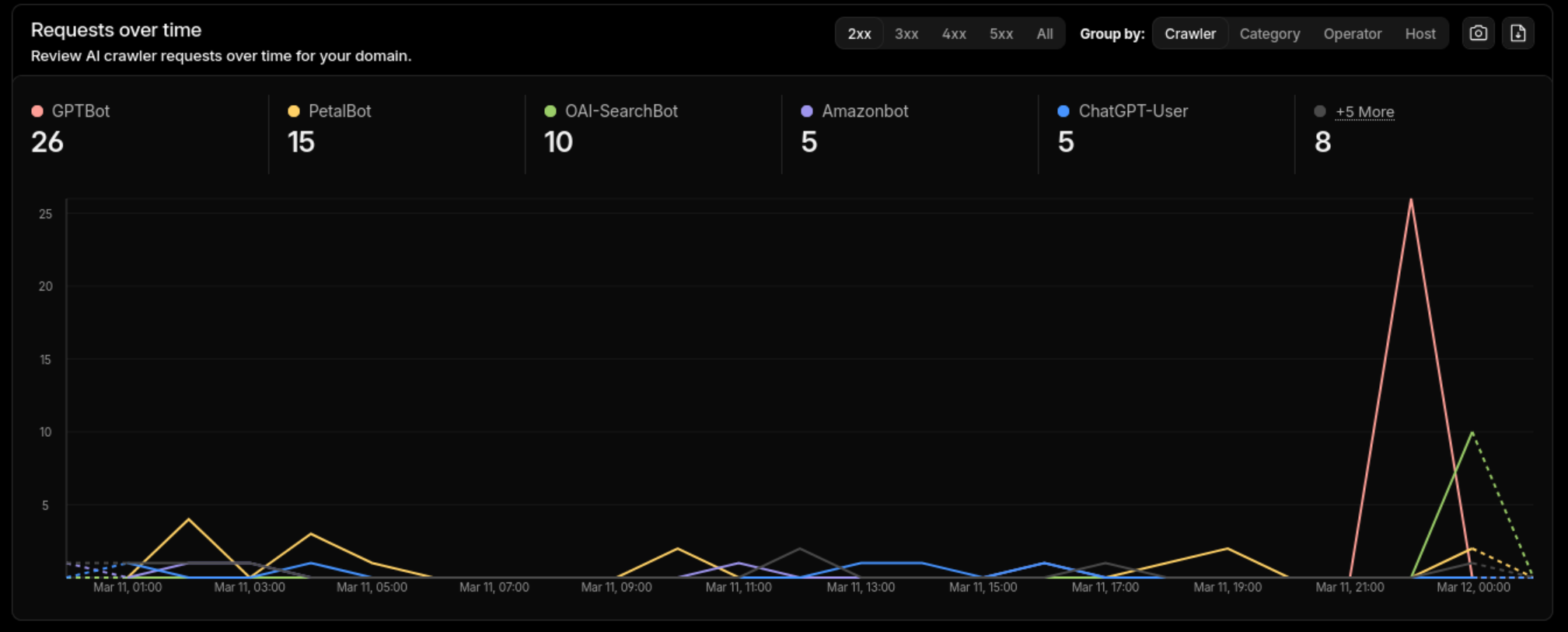
LLMs are already crawling your blog. Cloudflare’s AI bot analytics show GPTBot, OAI-SearchBot, and others making dozens of requests per day to small personal sites. But when these models cite your content, they hallucinate URLs, misattribute claims, and lose context. The problem isn’t access - most blogs just serve content optimized for humans and search engines, not for language models.
This post covers the changes I made to this Hugo site (PaperMod theme) to fix that.
What LLMs Need to Cite You Correctly
When an LLM reads your blog post, it’s working with raw HTML. It guesses which text is the title, who the author is, what the publication date is. Usually it gets close enough. When it doesn’t, you get cited with the wrong date, a hallucinated URL, or a summary that misrepresents your point.
What helps:
- Structured metadata - author, date, description in machine-readable formats (JSON-LD, front matter)
- A plaintext index - a single file listing all content with descriptions, so models can discover posts without crawling HTML
- Pre-summarized content - descriptions and key takeaways that models can use directly instead of generating their own
- Problem-first writing - leading with the claim rather than the anecdote, so the first paragraph carries the key context
llms.txt - A Plaintext Index for Models
The llms.txt specification defines a simple plaintext file at your site root that lists content with descriptions. Think robots.txt, but for helping models understand what’s on your site rather than restricting access.
Here’s what the llms.txt for this site looks like:
# Musings of an AI Wrangler

> I am a software engineer that loves solving complicated problems. Once in a while I solve a problem I want to document, so I'll do that here.

## Posts

- [Making Your Hugo Blog Citable by LLMs](https://mazurov.dev/posts/making-your-blog-citable-by-llms/llms.txt): Practical steps to help LLMs accurately cite your blog...
- [Fixing the '?' Hostname Problem on OpenWrt Access Points](https://mazurov.dev/posts/openwrt-ap-hostname-sniffer/llms.txt): OpenWrt dumb APs show '?' for client hostnames...
Each post also gets its own /posts/slug/llms.txt endpoint with the raw markdown content, so a model can fetch the full text without parsing HTML.
Hugo implementation
Two pieces: output format definitions in config.toml and two templates.
In config.toml, define the output formats and assign them:
| |
The llms format is for the site-wide index (rooted at /llms.txt). The llmsmd format is for per-page plaintext. See the Hugo custom output formats documentation for details on these fields.
The homepage template at layouts/index.llms.txt:
# {{ site.Title }}

> {{ site.Params.profileMode.subtitle }}

## Posts

{{ range where site.RegularPages "Section" "posts" -}}
- [{{ .Title }}]({{ .Permalink }}llms.txt): {{ with .Description }}{{ . }}{{ else }}{{ .Summary | plainify | truncate 160 }}{{ end }}
{{ end -}}
The per-page template at layouts/_default/single.llmsmd.txt:
---
title: {{ .Title }}
date: {{ .Date.Format "2006-01-02" }}
url: {{ .Permalink }}
{{- with .Description }}
description: {{ . }}
{{- end }}
{{- with .Params.tags }}
tags: {{ delimit . ", " }}
{{- end }}
---

{{ .RawContent }}
Each post link in the index points to {permalink}llms.txt, giving models a direct path from index to full plaintext content.
Schema.org BlogPosting Markup
JSON-LD BlogPosting schema gives models structured fields they can extract without guessing: headline, description, author, datePublished, dateModified, articleBody, and wordCount.
The author object includes sameAs links to social profiles, which helps models verify identity across platforms. Here’s a simplified example of the JSON-LD this site produces:
| |
Hugo implementation
The schema is rendered by a partial at layouts/partials/templates/schema_json.html. PaperMod includes a version of this; I extended it to include sameAs on the author object and to emit a BreadcrumbList for navigation context.
This is also where Google’s article structured data guidelines overlap - the same markup that helps Google’s Rich Results also helps LLMs parse your content.
Structured Front Matter
Two front matter fields do the most work here:
description - a concise factual summary of the post. Models use this as a citation snippet instead of generating their own. Without it, they summarize from the body text and often miss the point.
takeaways - a list of pre-summarized key points. These render as a “Key Takeaways” section before the content and give models a structured list of claims to cite directly.
Before:
| |
After:
| |
The description ends up in both the Schema.org JSON-LD and the llms.txt index. The takeaways render via a Hugo partial (layouts/partials/takeaways.html) as a styled list before the post body:
| |
Problem-First Writing
Models extract the first paragraph as the key context for a page. If you lead with an anecdote, the model’s summary will be about the anecdote, not your actual point.
Before:
I was playing around with my AC remote one weekend and realized it was using IR signals. I started wondering if I could capture them…
After:
Many AC units ship with IR-only remotes and no smart control interface. ESPHome’s
climate_ircomponent can decode and replay these signals, but most manufacturer protocols aren’t documented.
The second version front-loads the problem and the technology. The anecdote can come later.
Verification
Check llms.txt renders:
| |
Validate Schema.org markup: Run your URL through Google’s Rich Results Test or the schema.org validator. Check that BlogPosting, BreadcrumbList, and author sameAs links are present and valid.
Check AI crawler access: If you’re on Cloudflare, enable AI bot analytics under Security > Bots. This doesn’t block anything by default - it just gives you visibility into which AI crawlers are hitting your site. The cover image of this post shows real traffic from GPTBot, PetalBot, OAI-SearchBot, Amazonbot, and ChatGPT-User.
Test with an LLM: Ask Claude or ChatGPT about your content and check the citations.
Build locally and check JSON-LD:
| |
PaperMod only renders JSON-LD in production mode (hugo.IsProduction gate in head.html). The dev server runs in development mode by default. Use hugo server -e production or add env = "production" to [params] in your config to see it locally.
FAQ
Should I block AI crawlers?
That’s up to you. I don’t - I use AI crawlers myself and want my content indexed by them. Cloudflare’s AI bot management lets you monitor crawler traffic without blocking it. If you do want to block specific crawlers, add User-agent: GPTBot / Disallow: / to your robots.txt. The OpenAI crawlers documentation lists their user agents.
Is llms.txt an official standard? It’s a community proposal adopted by several sites. Not an IETF RFC or W3C recommendation. But it’s simple, costs nothing to implement, and there’s no competing spec.
Does this work with themes other than PaperMod?
The principles apply to any Hugo theme. The config.toml output format definitions and llms.txt templates are theme-independent. The Schema.org partial path (layouts/partials/templates/schema_json.html) may differ - check your theme’s layout structure. The takeaways partial is custom and works with any theme.